-
Year of the Fire Horse 2026: Meaning and Themes

2026: Welcoming the Year of the Fire Horse
The Chinese zodiac is a centuries-old system that blends astronomy, mythology, and philosophy into a repeating twelve-year cycle. Each year is represented by an animal, and every cycle is further shaped by one of five elements: Wood, Fire, Earth, Metal, and Water. Together, these animals and elements create a rich tapestry of symbolism that many people use for reflection, celebration, and cultural connection.
In 2026, the zodiac turns to one of its most dynamic combinations: the Year of the Fire Horse.
Understanding the Horse in the Zodiac
The Horse is the seventh animal in the Chinese zodiac cycle. Traditionally, it represents:
- Energy and vitality
- Independence and freedom
- Adventure and movement
- Charisma and social charm
People born in Horse years are often described as lively, optimistic, and quick-thinking. They tend to enjoy travel, new experiences, and meaningful personal challenges. The Horse is also associated with determination, making it a symbol of progress and forward momentum.
The Influence of the Fire Element
When the Horse is paired with the Fire element, its natural traits become even more intense and expressive. Fire in Chinese philosophy symbolizes:
- Passion and inspiration
- Leadership and courage
- Creativity and transformation
A Fire Horse year is often considered bold and unpredictable. It carries a spirit of enthusiasm and innovation, encouraging individuals and societies to take action, pursue dreams, and embrace change.
Traits of the Fire Horse
Those born in a Fire Horse year are often described as:
- Highly energetic and ambitious
- Charismatic and persuasive
- Independent thinkers
- Adventurous and risk-tolerant
- Sometimes impulsive or headstrong
The Fire Horse is seen as one of the most spirited combinations in the zodiac, representing intensity, ambition, and a strong desire for freedom.
Historical Significance of Fire Horse Years
Fire Horse years occur every 60 years. Two recent examples are 1966 and the upcoming 2026.
The year 1966 holds a notable place in cultural memory. In some East Asian traditions, the Fire Horse was believed to bring strong-willed and independent personalities, especially among women. This belief led to a significant drop in birth rates in countries such as Japan during that year. It remains a fascinating example of how zodiac traditions can influence social behavior on a large scale.
Over time, attitudes toward the Fire Horse have become more positive, with many modern interpretations focusing on its strength, courage, and leadership qualities.
Themes and Predictions for 2026
While zodiac forecasts are symbolic rather than scientific, many astrologers see the Fire Horse as a sign of motion, bold decisions, and personal reinvention.
Common themes associated with a Fire Horse year include:
- Rapid change and new opportunities
- Strong leadership and decisive action
- Increased creativity and innovation
- A spirit of independence and exploration
- Heightened energy in social and cultural movements
For individuals, 2026 may feel like a year that rewards initiative. It is a time to pursue goals with confidence, try something new, and trust one’s instincts.
An old saying associated with the Horse captures the spirit of the year:
“A swift horse covers a thousand miles in a single day.”
The message is simple and inspiring. With focus and determination, great progress is possible.
Looking Ahead
The Year of the Fire Horse invites bold thinking, courageous choices, and a willingness to move forward with purpose. It is a year that celebrates independence and action, encouraging people to break free from old patterns and embrace fresh opportunities.
Whether viewed through tradition, culture, or simple curiosity, 2026 offers a powerful symbol of energy, ambition, and forward motion. It is a reminder that sometimes the best path is the one that calls for courage and a spirited leap ahead.
Write the platform-specific Social Media Promo Kit and add next Facebook image size 1200×630, X image size 1200×628, Instagram image size 1080×1080, LinkedIn image size 1200×626 , Reddit image size 1920×1080, Pinterest image size 1000×1500, YouTube Community image size 1080×1080, with the image prompts and captions for each and the WordPress Essentials Title (under 60 characters), Permalink URL image size 1080×1080, Excerpt, Meta Description (under 160 characters), SEO Tags (comma-separated), Featured Image ALT Text for this post Keep the alt tag concise yet descriptive for accessibility and SEO.
-
MXToolbox: Check Your Domain and Email Health
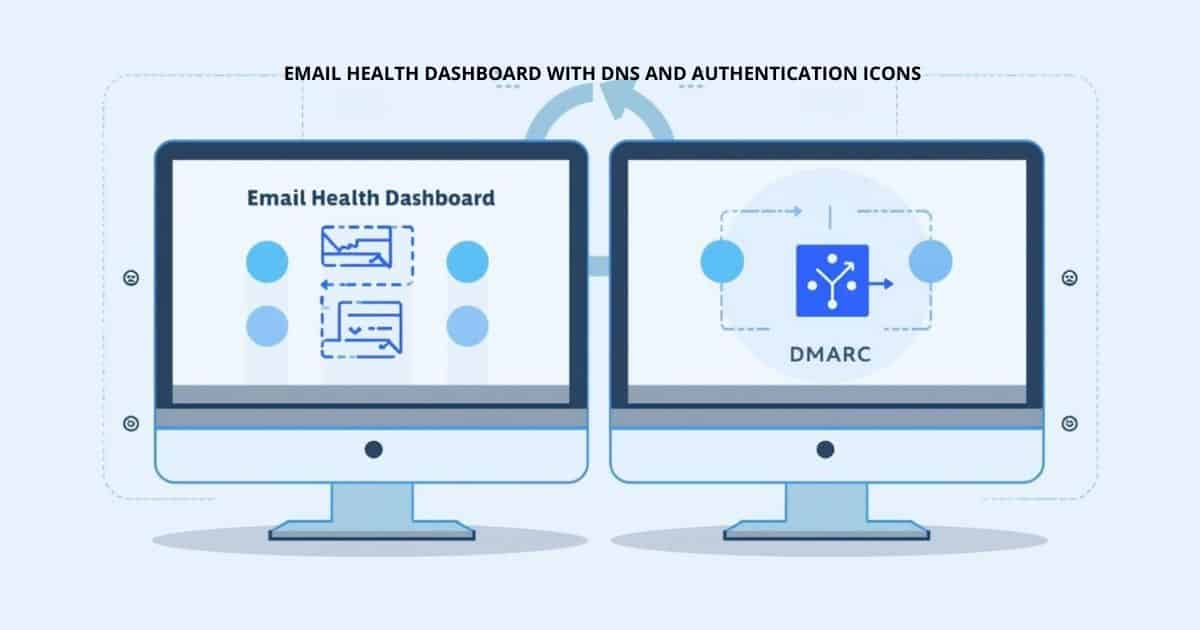
Why MXToolbox Is a Must-Have for Domain and Email Health
When email works, nobody notices. Messages arrive on time, invoices get paid, newsletters are opened, and your online reputation grows quietly in the background. But when something goes wrong, it often happens without warning. Suddenly emails bounce, land in spam folders, or never arrive at all.
That is where MXToolbox becomes an essential tool. It is widely respected across the hosting, IT, and digital marketing industries as a reliable way to check the health of your domain and email setup.
What Is MXToolbox?

MXToolbox is an online diagnostic platform designed to help website owners, administrators, and creators understand how their email and domain infrastructure is performing.
At its core, it acts like a health scanner for your domain. It checks your DNS records, mail servers, and reputation across the internet to ensure everything is configured correctly and functioning as expected.
For anyone running a website, sending newsletters, or managing business email, this kind of visibility is incredibly valuable.
Key Features That Make MXToolbox Stand Out
1) DNS Record Verification
Email delivery depends on several critical DNS records. If even one is misconfigured, your messages may be rejected or flagged as spam.
MXToolbox helps you verify:
- SPF (Sender Policy Framework)
Confirms which servers are allowed to send email on behalf of your domain. - DKIM (DomainKeys Identified Mail)
Ensures messages are cryptographically signed to verify authenticity. - DMARC (Domain-based Message Authentication, Reporting, and Conformance)
Provides policy instructions to receiving servers and reports on email activity.
These records work together to prove that your email is legitimate. MXToolbox checks each one and highlights any issues.
2) Blacklist Monitoring
One of the most common causes of email delivery problems is being listed on a spam or security blacklist.
MXToolbox can:
- Check your domain or IP against dozens of major blacklists
- Identify exactly where a listing occurs
- Provide guidance on how to resolve it
This is especially helpful if emails suddenly stop reaching recipients. A quick blacklist check often reveals the root of the problem.
3) Mail Server Configuration Checks
Proper mail server setup is essential for reliable communication. MXToolbox analyzes:
- MX records and mail routing
- Reverse DNS configuration
- SMTP server responses
- Open relay vulnerabilities
These checks ensure your server is secure, reachable, and correctly configured.

Hundreds of Tests in a Single Scan
One of the most impressive aspects of MXToolbox is its ability to run hundreds of automated diagnostics in just a few moments.
Instead of manually checking each record or server setting, the platform performs:
- DNS lookups
- SMTP connection tests
- Reputation checks
- Authentication record analysis
- Delivery path diagnostics
The result is a clear, easy-to-read report that highlights:
- Errors that must be fixed
- Warnings that may cause issues
- Confirmed settings that are working correctly
This comprehensive approach saves time and removes guesswork.
Free Basic Tools That Deliver Real Value
One of the biggest advantages of MXToolbox is its free basic usage option.
With no cost at all, users can:
- Run blacklist checks
- Verify DNS records
- Test mail server connectivity
- Diagnose delivery problems
For small businesses, bloggers, nonprofits, and independent creators, this makes professional-grade diagnostics accessible without needing an expensive IT subscription.
A Real-World Example
Imagine you run a newsletter and suddenly notice open rates dropping. Subscribers say they never received your messages.
You run a quick MXToolbox scan and discover:
- Your domain appears on a minor spam blacklist
- Your DMARC policy is missing
- Your reverse DNS is misconfigured
Within an hour, you fix the DNS settings and submit a delisting request. The next campaign delivers normally.
Without a tool like MXToolbox, that problem might have taken days or weeks to identify.
Why It Matters for Anyone with a Website
Whether you run:
- A personal blog
- A nonprofit newsletter
- A small business website
- A large corporate domain
Your email reputation directly affects communication, trust, and revenue.
MXToolbox gives you:
- Immediate insight into domain health
- Early warnings about potential issues
- Clear steps to improve deliverability
Final Thoughts
MXToolbox has earned its reputation as an industry-standard diagnostic tool for a reason. It combines powerful testing capabilities with a simple interface and a free entry point that makes it accessible to everyone.
If you rely on email for communication, marketing, or customer service, running regular checks with MXToolbox is a smart, proactive step. A quick scan today can prevent frustrating delivery problems tomorrow.
As always Thanks for engaging with this episode of
Practical Digital Strategies
Why MXToolbox Is a Must-Have for Domain and Email HealthTo share this Google Document associated with this episode, please click on the “Share” link above.
If you’re on a desktop, find the episode title at https://guyrcook.com
I hope you enjoy the content.
What I use for ‘face to face’ is https://whereby.com/
Official website: https://guyrcook.com
LinkedIn: https://www.linkedin.com/in/guycook/
X: https://X.com/Guyrcookrepor
Facebook: https://www.facebook.com/GuyRCookReportPersonalBlog
Instagram: https://www.instagram.com/guyrcook/Vivaldi Social: https://social.vivaldi.net/@guyrcook
Reddit: https://www.reddit.com/user/UncleGuy/
Stack Overflow: https://stackoverflow.com/users/25119577/guy-r-cook
Thank you for taking the time to listen, view or read.
SUBSCRIBE ON YOUTUBE https://www.youtube.com/@PracticalDigitalStrategies
The link for viewing this episode on YouTube is https://youtu.be/w8bShcFIFqk
Amazon affiliate link: https://guyrcook.com/computers-tablets-stuff/
On X https://X.com/guyrcook
On Facebook https://www.facebook.com/GuyRCookReportPersonalBlog
Check out Ileane Smith and Fraser Ramsey
Don’t miss out on this must-listen resource for anyone looking to succeed in the digital space.
#wordpress,#fraser_ramsay,#ileane_smith,#googledocs
How to save content as a PDF on desktop
Before you go
Subscribe where you listen to podcasts
vDomainHosting, Inc
Kennewick, WA 99337
Get the latest tech education and digital marketing insights; Internet Marketing and Consulting Services
Podcast RSS Feed Youtube Playlist
- SPF (Sender Policy Framework)
-
Meet Expectations, Keep Creative Momentum

Meet Expectations, Keep Creative Momentum: A Creator’s Guide to Staying Ahead
In today’s fast-moving content landscape, attention is earned one experience at a time. Audiences have more choices than ever, and they quickly gravitate toward creators who deliver clarity, consistency, and value. Meeting user expectations is not just about avoiding complaints. It is about building trust, encouraging loyalty, and creating a reputation that keeps people coming back for more.
A proactive, customer-centric mindset helps creators stay relevant and respected. When you understand what your audience wants and consistently deliver on those expectations, you position yourself as a dependable voice in your niche.
Research: Understand What Your Audience Truly Needs
Great content begins with insight. Assumptions about your audience rarely lead to the best results. Instead, successful creators take time to learn what their readers, viewers, or listeners actually want.
Practical steps you can use today:
- Review comments, emails, and messages for recurring questions.
- Study analytics to see which posts or videos perform best.
- Use simple polls or surveys to ask your audience directly.
- Observe what similar creators are doing successfully.
This research provides direction. It tells you not just what to create, but how to present it in a way that resonates.
Transparency: Build Trust Through Clear Communication
Audiences appreciate honesty. When you clearly communicate what you offer, how often you publish, and what people can expect, you eliminate confusion and build confidence.
Ways to be more transparent:
- Set a predictable publishing schedule.
- Clearly label sponsored or affiliate content.
- Be open about changes to your format or posting frequency.
- Share behind-the-scenes updates when appropriate.
Transparency creates a sense of reliability. When people know what to expect, they are more likely to stay engaged.
Rapid Support: Respond Quickly and Thoughtfully
In the digital world, response time matters. A quick, helpful reply can turn a frustrated follower into a loyal supporter.
Simple support habits:
- Check comments and messages at set times each day.
- Create short, helpful replies to common questions.
- Acknowledge feedback, even if you cannot act on it immediately.
- Use auto-responses or FAQs for frequent inquiries.
Prompt communication shows respect for your audience’s time and concerns.
Setting Goals: Align Expectations from the Start
When creators and audiences share the same expectations, satisfaction increases. This applies to everything from newsletter content to membership programs.
Strategies to align expectations:
- Clearly describe what subscribers will receive.
- Provide examples of past content.
- Set realistic timelines for new projects or features.
- Avoid overpromising. Under-promise and over-deliver whenever possible.
When people understand what they are signing up for, they are more likely to remain satisfied.
Leveraging AI: Deliver Faster, Smarter Experiences
AI and automation tools have become powerful allies for content creators. They can help you respond faster, personalize experiences, and maintain consistency.
Ways to use AI effectively:
- Automate welcome emails for new subscribers.
- Use AI tools to generate content outlines or ideas.
- Set up chatbots or automated responses for common questions.
- Schedule posts in advance to maintain consistency.
AI should support your voice, not replace it. The goal is to free up your time so you can focus on meaningful interactions and creative work.
Empathetic Communication: The Heart of Long-Term Loyalty
People connect with people, not just content. Empathy builds relationships that last beyond a single post or video.
How to communicate with empathy:
- Acknowledge concerns before offering solutions.
- Use a conversational, respectful tone.
- Thank your audience for feedback and participation.
- Share stories or experiences that reflect common challenges.
When your audience feels heard and valued, loyalty naturally follows.
Conclusion: Consistency Creates Confidence
Meeting user expectations is a continuous process. It starts with research, grows through transparency, and thrives on responsiveness and empathy. By setting clear goals, using AI wisely, and maintaining open communication, you create an experience people trust.
Start small. Choose one area to improve this week, whether it is faster responses, clearer messaging, or better audience research. Each step strengthens the relationship you have with your audience and keeps your content moving forward with purpose.
As always Thanks for engaging with this episode of
Practical Digital Strategies
Meet Expectations, Keep Creative MomentumTo share this Google Document associated with this episode, please click on the “Share” link above.
If you’re on a desktop, find the episode title at https://guyrcook.com
I hope you enjoy the content.
What I use for ‘face to face’ is https://whereby.com/
Official website: https://guyrcook.com
LinkedIn: https://www.linkedin.com/in/guycook/
X: https://X.com/Guyrcookrepor
Facebook: https://www.facebook.com/GuyRCookReportPersonalBlog
Instagram: https://www.instagram.com/guyrcook/Vivaldi Social: https://social.vivaldi.net/@guyrcook
Reddit: https://www.reddit.com/user/UncleGuy/
Stack Overflow: https://stackoverflow.com/users/25119577/guy-r-cook
Thank you for taking the time to listen, view or read.
SUBSCRIBE ON YOUTUBE https://www.youtube.com/@PracticalDigitalStrategies
The link for viewing this episode on YouTube is https://youtu.be/Acbo9iJCejE
Amazon affiliate link: https://guyrcook.com/computers-tablets-stuff/
On X https://X.com/guyrcook
On Facebook https://www.facebook.com/GuyRCookReportPersonalBlog
Check out Ileane Smith and Fraser Ramsey
Don’t miss out on this must-listen resource for anyone looking to succeed in the digital space.
#podbean,#theguyrcookreport,#podcast_hosting,#podcasting,#landingpage,#wordpress,#fraser_ramsay,#ileane_smith,#googledocs
Link to the Android mobile app for The Guy R Cook Report
How to save content as a PDF on desktop
Before you go
Subscribe where you listen to podcasts
vDomainHosting, Inc
Kennewick, WA 99337
Get the latest tech education and digital marketing insights; Internet Marketing and Consulting Services
Podcast RSS Feed Youtube Playlist
- Review comments, emails, and messages for recurring questions.
-
Better Blog Ideas Faster with a ChatGPT Prompt Generator

Unlock Better Blog Ideas with a ChatGPT Prompt Generator
Coming up with strong blog ideas is often the hardest part of writing. Deadlines approach, the cursor blinks, and even experienced writers can feel stalled. This is where a ChatGPT Prompt Generator shines. It turns the blank page into a starting line and transforms brainstorming into a fast, creative, and repeatable process.
Faster Brainstorming Without Sacrificing Creativity
A prompt generator dramatically reduces the time it takes to move from idea to outline. Instead of wrestling with vague concepts, you receive focused prompts that guide your thinking. These prompts act as creative sparks, helping you explore angles you may not have considered.
Efficiency does not mean generic output. Well structured prompts encourage original thinking by framing topics in new ways, such as asking for comparisons, step by step guides, or audience specific perspectives. The result is a steady flow of ideas that still feel thoughtful and distinctive.
A Practical Cure for Writer’s Block
Writer’s block often comes from pressure and uncertainty, not a lack of skill. A prompt generator removes that pressure by giving you something concrete to respond to. Even a simple prompt can shift your mindset from stuck to engaged.
For example, instead of asking yourself “What should I write about,” a prompt might suggest:
- Write a blog post explaining a common mistake beginners make in your niche and how to avoid it.
- Explore a trend in your industry and predict how it will evolve over the next year.
These targeted starting points make it easier to begin writing, and once you start, momentum follows.
Easy to Use for Writers at Any Level
One of the greatest strengths of a ChatGPT Prompt Generator is accessibility. You do not need advanced technical skills or a complex setup. Beginners can use prompts as learning tools to understand structure and tone, while experienced writers can use them to accelerate ideation and expand creative range.
Because prompts can be refined and customized, the tool adapts to your needs. You can generate ideas for short blog posts, long form guides, newsletters, or even multi part series, all with minimal effort.
From One Prompt to Many Unique Topics
A single well crafted prompt can lead to dozens of content ideas. For instance:
- A prompt about productivity can branch into tools, habits, case studies, or personal experiments.
- A prompt about travel can inspire destination guides, budgeting tips, cultural insights, or seasonal itineraries.
By adjusting the audience, format, or goal within the prompt, you unlock a wide variety of topics from the same core idea. This makes content planning more strategic and far less overwhelming.
Making Prompt Generators Part of Your Writing Routine
Using a ChatGPT Prompt Generator works best when it becomes a regular part of your workflow. Start brainstorming sessions with prompts, select the ideas that resonate most, and then shape them with your own voice and expertise. Over time, you will notice increased consistency, stronger angles, and less time spent staring at a blank screen.
For writers who value both creativity and efficiency, prompt generators offer a powerful advantage. They do not replace your insight or experience. They amplify it, helping you generate better blog ideas faster and with greater confidence.
-
Why Measuring Website Speed Really Matters

In today’s fast paced digital landscape, the speed at which your website loads can make or break the user experience. Visitors expect pages to appear almost instantly, and even a small delay can lead to higher bounce rates, lost trust, and missed opportunities for engagement or conversions.
In this post, you will learn why measuring website loading speed with dedicated performance tools is essential for both site owners and developers. We will explore how these tools go beyond simple load times to deliver detailed metrics, identify hidden bottlenecks, and provide clear, actionable recommendations that help you improve performance, usability, and overall web success.
The best way to measure your website’s loading speed is by using dedicated performance tools. These tools provide comprehensive metrics and actionable recommendations for improvement.
Top Tools for Website Speed Testing
- Google PageSpeed Insights: This free tool is essential because it provides data directly from Google, including the Core Web Vitals metrics (Largest Contentful Paint, Interaction to Next Paint, and Cumulative Layout Shift) that impact search rankings. It shows both real-world user data (field data) and lab data (controlled tests) for both mobile and desktop.
- GTmetrix: Known for its detailed analysis, GTmetrix provides an easy-to-read summary report, including a “waterfall chart” that visualizes the load time of every single file on your page. You can test your site from various global locations and track performance history.
- WebPageTest: This is an excellent choice for advanced users, offering extensive customization options to test from specific devices, different global locations, and connection speeds. It offers a highly detailed technical analysis and a comprehensive content breakdown.
- Pingdom Website Speed Test: Pingdom offers a simple, straightforward interface for quick tests from multiple global polling locations. It’s useful for monitoring uptime and performance over time.
-
Using Archive.org to Preserve the Web
Using Archive.org to periodically back up online content is crucial for preserving digital history, ensuring content permanence, enabling research/analysis, and building credibility, as it captures website snapshots before they disappear, offering a free, public record for future access, trend analysis (like SEO changes), and proving a site’s longevity and trustworthiness. It combats the ephemeral nature of the web by saving text, images, and multimedia for generations to come, acting as a vital library of humanity’s online presence.
Key Benefits of Periodic Archiving
- Digital Preservation: The web is constantly changing; archiving ensures valuable information isn’t lost forever when pages are deleted or updated.
- Historical Research: Provides snapshots for scholars, historians, and the public to study the evolution of websites, topics, and digital culture.
- Content Reliability: Offers a verifiable record of past content, allowing users to cite or reference older versions of pages.
- Credibility & Trust: A documented history on Archive.org shows a website’s persistence, boosting confidence from users, partners, and search engines.
- SEO & Marketing Analysis: Marketers and SEO professionals use it to track changes in content, layout, and promotions, understanding their impact on traffic over time.
- Competitive Intelligence: Allows analysis of how competitors’ sites have evolved, revealing strategic shifts.
- Public Access: Makes vast amounts of digital information freely accessible, supporting open knowledge.
How it Works for You
- You can save your own sites: Manually save specific pages or entire sites to ensure they’re captured, creating a personal archive.
- It’s mostly automatic: Archive.org’s crawlers continuously capture public web pages, but targeted saves ensure specific content is preserved.
By periodically backing up content, you contribute to a shared digital heritage and safeguard important information from the internet’s inherent impermanence, much like preserving physical libraries.
At Archive.org use your free login to https://web.archive.org/save that initiates a crawl using the selected options
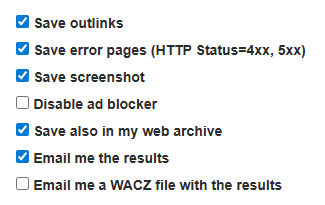
To capture both the sitemap file and its related assets. Click SAVE PAGE and then wait, as in check if the tea water is hot.
Upon completion, the system generates an archived URL tied to a specific timestamp. Record this URL into your calendar for reference. This archived instance serves as an independent verification that the sitemap existed, was accessible, and contained valid links at that point in time. Retaining this record supports future audits, SEO diagnostics, and historical comparisons.As always Thanks for engaging with this episode of
Practical Digital StrategiesUsing Archive.org to Preserve the Web
To share this Google Document associated with this episode, please click on the “Share” link above.If you’re on a desktop, find the episode title at https://guyrcook.com
I hope you enjoy the content.
What I use for ‘face to face’ is https://whereby.com/
Official website: https://guyrcook.com
LinkedIn: https://www.linkedin.com/in/guycook/
X: https://X.com/Guyrcookrepor
Facebook: https://www.facebook.com/GuyRCookReportPersonalBlog
Instagram: https://www.instagram.com/guyrcook/Vivaldi Social: https://social.vivaldi.net/@guyrcook
Reddit: https://www.reddit.com/user/UncleGuy/
Stack Overflow: https://stackoverflow.com/users/25119577/guy-r-cook
Thank you for taking the time to listen, view or read.
SUBSCRIBE ON YOUTUBE https://www.youtube.com/@PracticalDigitalStrategies
The link for viewing this episode on YouTube is https://youtu.be/3y1aBqhkyXw
Amazon affiliate link: https://guyrcook.com/computers-tablets-stuff/
On X https://X.com/guyrcook
On Facebook https://www.facebook.com/GuyRCookReportPersonalBlog
Check out Ileane Smith and Fraser RamseyDon’t miss out on this must-listen resource for anyone looking to succeed in the digital space.
#podbean,#theguyrcookreport,#podcast_hosting,#podcasting,#landingpage,#wordpress,#fraser_ramsay,#ileane_smith,#googledocs
Link to the Android mobile app for The Guy R Cook Report
How to save content as a PDF on desktop
Before you go
Subscribe where you listen to podcasts
vDomainHosting, Inc
Kennewick, WA 99337
Get the latest tech education and digital marketing insights; Internet Marketing and Consulting Services
Podcast RSS Feed Youtube Playlist
-
Why Subscribing & Notifications Matter More Than Ever
Why Subscribing and Enabling Notifications Matters More Than Ever
In a world where information moves faster than ever, staying informed can feel overwhelming. New articles, updates, videos, and announcements appear constantly, and it’s easy to miss what actually matters to you. Subscribing to trusted sources and enabling notifications is one of the simplest ways to cut through the noise and stay connected to the updates that are truly relevant.
The Value of Subscribing
Subscribing to newsletters, blogs, podcasts, or channels is about more than convenience. It’s about creating a reliable information stream tailored to your interests.
Key benefits include:
- Timely information – Subscriptions deliver updates directly to you, saving time spent searching.
- Curated content – Creators often share their most important or insightful work with subscribers first.
- Consistency – Regular updates help you stay engaged with topics you care about without falling behind.
- Exclusive insights – Many subscriptions include behind-the-scenes content, early access, or subscriber-only resources.
Instead of relying on algorithms or chance discovery, subscriptions put you in control of what you receive.
Why Notifications Make a Difference
Subscribing sets the foundation, but enabling notifications ensures you never miss critical updates. Notifications act as gentle reminders, alerting you when something new is available.
When used thoughtfully, notifications:
- Highlight breaking news or time-sensitive updates.
- Reduce the need to constantly check websites or apps.
- Improve the overall user experience by delivering updates when they matter most.
- Help you stay engaged with creators, organizations, or communities you support.
The key is balance. Notifications should inform, not overwhelm.
Practical Tips for Managing Subscriptions and Notifications
To get the most value without overload, a little organization goes a long way:
- Be selective: Subscribe only to sources that consistently add value.
- Use folders or labels: Group newsletters or alerts by topic in your email or apps.
- Adjust notification settings: Choose priority alerts instead of “all notifications.”
- Review periodically: Unsubscribe from sources that no longer align with your interests.
- Set boundaries: Designate certain times of day to review updates instead of reacting instantly.
These small steps help keep your digital life focused and manageable.
Take Action: Stay Connected, Stay Informed
Staying updated doesn’t have to be stressful or time-consuming. By subscribing to the sources you trust and enabling notifications that matter, you create a smarter, more intentional way to stay informed.
Take a moment today to subscribe to your favorite blogs, newsletters, and channels—and turn on notifications where it makes sense. It’s a simple action that ensures you stay connected, informed, and ready to act on what matters most to you.
audience connection, Content Visibility, creator updates, digital engagement, digital life curated existence human connection personal growth emotional awakening algorithmic control independent bookstore live music unexpected discovery minimalist living, email subscriptions, enable notifications, newsletters, social algorithms - Timely information – Subscriptions deliver updates directly to you, saving time spent searching.
-
Linux Mint bonus

Why Linux Mint Makes Chrome Updates Seamless Across Platforms
Introduction: Linux Mint’s Quiet Strength in a Noisy Ecosystem
In an era dominated by rapid software change, stability and predictability have become underrated features. Linux Mint stands out in the modern software ecosystem because it delivers both without sacrificing usability. Built on a solid Ubuntu/Debian foundation, Linux Mint has earned a reputation for being approachable, reliable, and remarkably well-polished—especially for users who value getting work done over constant system tinkering.
One of its lesser-discussed strengths is how well it handles software updates, particularly with widely used applications like the Google Chrome browser. For users who move between Linux and Windows environments, this creates a surprisingly seamless experience.
How Linux Mint and Chrome Updates Work Together
Linux Mint uses a centralized package management system that keeps the operating system and applications updated in a controlled, consistent way. When you install Chrome on Linux Mint, it integrates directly into this system.
Here’s what happens behind the scenes:
- Chrome installs its own signed software repository on Linux Mint
- When you run system updates, Chrome is updated alongside the OS
- Version parity is maintained with Chrome releases on Windows
Because Chrome uses the same release channels across platforms, the version you receive on Linux Mint closely matches the Windows release. This means new features, security patches, and performance improvements appear at nearly the same time—without requiring separate manual updates.
In practical terms, updating Linux Mint keeps Chrome fully current, and that current version behaves the same way when you later use Chrome on Windows. Bookmarks, extensions, sync settings, and browser behavior remain consistent, reducing friction when switching machines or operating systems.
Key Benefits of Using Linux Mint
1. Unified Update Management
Linux Mint updates the operating system, drivers, and applications—including Chrome—in one place. This eliminates the need for individual updaters running in the background and reduces update fatigue.
2. Cross-Platform Consistency
Because Chrome stays aligned with Windows releases, users experience fewer surprises when moving between systems. The browser looks, feels, and behaves the same across platforms.
3. Stability Without Stagnation
Linux Mint is conservative where it matters and current where it counts. Core system components remain stable, while applications like Chrome stay up to date.
4. Lower Maintenance Overhead
Fewer reboots, fewer interruptions, and fewer broken updates make Linux Mint ideal for creators, developers, and everyday users who value reliability.
5. Beginner-Friendly, Power-User Ready
Linux Mint’s update tools are simple enough for new users and transparent enough for experienced users who want control without complexity.
Conclusion: A Practical Choice for Modern Computing
Linux Mint proves that a modern operating system does not need to be complicated to be powerful. Its thoughtful update model, combined with seamless Chrome version alignment across Linux and Windows, delivers a smoother, more predictable computing experience.
For users who want a stable desktop, consistent browser behavior, and fewer maintenance headaches, Linux Mint is well worth considering. Whether you are exploring Linux for the first time or refining a multi-platform workflow, Linux Mint quietly delivers where it matters most.
-
Practical Digital Strategies for Modern Creators and Businesses
Practical Digital Strategies for Modern Creators and Businesses
Creating content today can feel overwhelming. Algorithms change, platforms rise and fall, and advice often sounds more complicated than it needs to be. The good news is that effective digital strategy is not about doing everything—it’s about doing the right things consistently.
This post is written for content creators who want practical direction, not hype. The focus is on aligning content with real user intent and building systems that last.
Start With User Intent, Not Ideas
Many creators begin with “What should I post next?” A more effective question is, “What problem is my audience trying to solve?”
User-intent–driven content focuses on:
- Questions people are actively searching for
- Problems they want clear answers to
- Information that helps them take the next step
When content aligns with intent, it naturally performs better in search, gets shared more often, and stays relevant longer.
Practical approach:
Review your existing content and ask:- Does this clearly answer a question?
- Is the purpose obvious within the first few paragraphs?
- Could someone act on this immediately?
If not, revise before creating something new.
Build Around a Home Base You Control

Social platforms are useful, but they should never be the foundation. Your website is where your work lives, compounds, and remains discoverable.
A strong creator website:
- Houses evergreen content
- Organizes ideas clearly
- Acts as an archive, not just a feed
- Supports email and search visibility
The site https://guyrcook.com is a solid example of long-term content accumulation. With hundreds of posts built over time, it demonstrates how consistent publishing creates a searchable knowledge base that continues to provide value well beyond the original publish date.
That is the goal: content that works while you focus on the next piece.
Think in Evergreen, Not Ephemeral
Not every post needs to chase a trend. In fact, most creators benefit more from evergreen content that stays useful.
Evergreen content includes:
- Guides
- Tutorials
- Explanations
- Resource roundups
- Opinion pieces grounded in experience
These pieces become reference points you can link back to from newsletters, social posts, and future articles.
Tip:
Before publishing, ask, “Will this still make sense six months from now?” If the answer is yes, you’re building an asset.
Write Like a Human, Optimize Like a Professional
Good SEO today is good communication.
That means:
- Clear headlines
- Short paragraphs
- Helpful subheadings
- Natural language
Avoid writing for search engines. Write for people first, then make sure the structure supports discovery.
If your content sounds like something you would explain to a colleague over coffee, you are on the right track.
Use Email to Build Real Connection
An email list is one of the few channels you truly own. Even a small list can be powerful if it’s built on trust and consistency.
You don’t need complex funnels. A simple cadence works:
- Share new content
- Highlight older, still-relevant posts
- Add short commentary or context
Over time, this reinforces your authority and brings readers back to your site.
Measure Progress, Not Perfection
Ignore vanity metrics when possible. Focus on indicators that reflect real engagement:
- Time on page
- Repeat visitors
- Email opens and replies
- Content that leads to action
Review performance periodically, not obsessively. Patterns matter more than spikes.
Keep It Sustainable
The best strategy is the one you can maintain.
Consistency beats intensity. Publishing one solid piece regularly will outperform sporadic bursts of activity followed by burnout.
Build systems, reuse what works, and allow your content library to grow steadily—just as it has on guyrcook.com.
Final Thought
Practical digital strategy is not about chasing every new tool or platform. It’s about understanding your audience, answering real questions, and building content that compounds over time.
If you focus on clarity, intent, and ownership, the rest tends to fall into place.
-
Super-Relevant Content Ahead of Google’s Updates

How to Create Super-Relevant Content That Stays Ahead of Google’s Updates by Focusing on User Intent
Search has changed dramatically over the past few years. Google’s updates—helpful content systems, E-E-A-T refinements, and the rise of AI-powered SERPs—have created a new reality: generic content no longer performs. Today, the pages that thrive are those built around one core principle: user intent.
Understanding what users truly want, not just what they type, is the most reliable way to stay ahead of Google’s updates. When your content aligns with intent, it remains resilient even as search algorithms evolve.
This guide breaks down how to create deeply relevant content that continues to rank, resonate, and convert long-term.
Why Intent-Driven Content Wins in Modern SEO
Google’s shift has been clear: reward content that solves problems, not content that simply targets keywords.
Recent updates focus heavily on:
• Whether content satisfies the purpose behind a query
• Whether the page offers unique and trustworthy value
• Whether users leave feeling their question or task was completed
• Whether the intent is informational, transactional, navigational, or experientialWhen your content satisfies a user’s why, it stays relevant—even as ranking factors shift.
How to Uncover Real User Intent (Beyond Keywords)
1. Analyze SERP Signals
Search results reveal Google’s interpretation of intent. Look for:
• Featured snippets ? fast answers
• Long-form guides ? deep information
• Product comparisons ? pre-purchase research
• Local packs ? location-based needs
• People Also Ask ? adjacent questions you must coverTreat SERPs as a live research tool, not just a ranking battleground.
2. Use Behavior-Based Tools
Heatmaps, session recordings, search-bar logs, and internal site search patterns reveal what users wanted but didn’t find.
3. Conduct First-Source Research
Some of the highest-performing content today is original:
• Polls
• Interviews
• Case studies
• Proprietary data
• Expert quotesThese satisfy Google’s need for depth and trust.
4. Join Conversations Where Your Audience Already Is
Study how real users phrase problems on:
• Reddit
• Niche forums
• Facebook Groups
• Quora
• YouTube commentsYou’ll discover motivations and objections that keyword tools never surface.
Frameworks for Creating Super-Relevant, Intent-Aligned Content
1. The “Three Layers of Intent” Model
To stay ahead of updates, optimize for all three:
- Primary Intent
The obvious goal (e.g., “best CRM software” = compare tools). - Secondary Intent
What users need to complete the task (pricing details, pros/cons, alternatives). - Emotional Intent
The underlying feeling that drives the search (avoid risk, save money, feel confident).
Winning content connects all three.
2. The “Content Purpose Matrix”
Map your content to four primary user missions:
Intent Meaning Best Format Learn Understand a topic Guides, explainers, tutorials Do Complete a task Step-by-step workflows, templates Compare Evaluate options Lists, comparison charts, case studies Decide Make a purchase or commitment Reviews, endorsements, FAQs This ensures your content delivers exactly what users expect.
3. The “Information Gap Method”
High-ranking pages often miss critical details. Fill those gaps by adding:
• Screenshots
• Examples
• Templates
• Real-world applications
• Updated statistics
• User-based variations
• Action checklistsThis alone can propel your content past older, weaker competitors.
Real-World Example: Intent Mismatch vs. Intent Alignment
Weak Content:
A blog titled “How to Start a Garden” that only lists generic steps without addressing climate zones, tools, timelines, or budget.Strong, Intent-Aligned Content:
A guide that includes:
• Climate-specific planting calendars
• Tool lists for beginners
• Budget tiers
• Mistakes to avoid
• A 90-day starter planThis solves the entire problem, not just part of it.
Content that anticipates needs always outperforms content that merely answers questions.
How to Future-Proof Content for Google’s Evolving Updates
1. Build “Complete Topic Coverage”
Cover entire user journeys, not isolated keywords.
Create clusters around goals, such as:
• “Start a podcast”
• “Grow YouTube traffic”
• “Plan a cross-state road trip”Google increasingly prefers authoritative hubs over scattered posts.
2. Prioritize Experience and Expertise
Search quality guidelines now emphasize E-E-A-T, with “Experience” gaining weight.
Show real involvement through:
• Screenshots from your own work
• Step-by-step walkthroughs
• Lessons learned
• Photos
• Personal testingAuthenticity is the algorithm’s new favorite signal.
3. Update Content Proactively
Your updates should include:
• Fresh statistics
• New tools or features
• Updated screenshots
• Revised steps based on changes in the field
• Expanded FAQsGoogle rewards content that demonstrates ongoing maintenance and relevance.
4. Structure Content for Search and Skimming
Formatting influences both ranking and user satisfaction:
• Descriptive H2/H3 headings
• Bullet points
• Key takeaways
• Visual examples
• Short paragraphs
• Clear definitionsWell-structured content rises to the top in AI-driven SERPs.
Actionable Tips to Start Implementing Today
• Build pages that fully answer why someone searched
• Read SERPs before writing a single word
• Use user forums and communities for intent research
• Integrate examples, templates, and real data
• Update top-performing posts quarterly
• Create content clusters focused on outcomes, not keywords
• Use headings aligned with user goals, not clever phrasingThese strategies help your content stay relevant regardless of coming updates.
Final Thoughts
Google’s algorithms will continue to evolve, but user intent remains constant. When content genuinely helps people accomplish their goals, it thrives.
By focusing on intent, not trends, you build an SEO foundation that endures algorithm changes, attracts engaged readers, and delivers long-term visibility.
- Primary Intent


